URL Encoder Spell Mistake: Common Errors, Causes, and How to Fix Them
You click a link. The page fails. The address bar shows a messy string full of percent signs. Sound familiar? That moment sends many people to search for a URL encoder spell mistake. Most of them don’t have a spelling problem at all. They have one of the many URL encoding errors that break links, forms, and APIs.
A single wrong character can wreck a request. A missing digit can send a visitor to the wrong page. The good news is that these bugs follow clear patterns. Once you know them, URL troubleshooting gets fast. Below you’ll find causes, fixes, examples in five programming languages, SEO effects, and security tips. Use it as a reference whenever a link misbehaves.
What Is a URL Encoder Spell Mistake?
A URL encoder spell mistake is a popular search phrase for invalid URL encoding. A URL encoder should turn unsafe text into safe percent-encoded characters. When that step goes wrong, the link breaks. A percent sign (%) may sit alone. A digit may be missing. A special character encoding step may never happen at all. People call it a “spell mistake” because the code looks misspelled. Yet the real culprit is incorrect percent encoding.
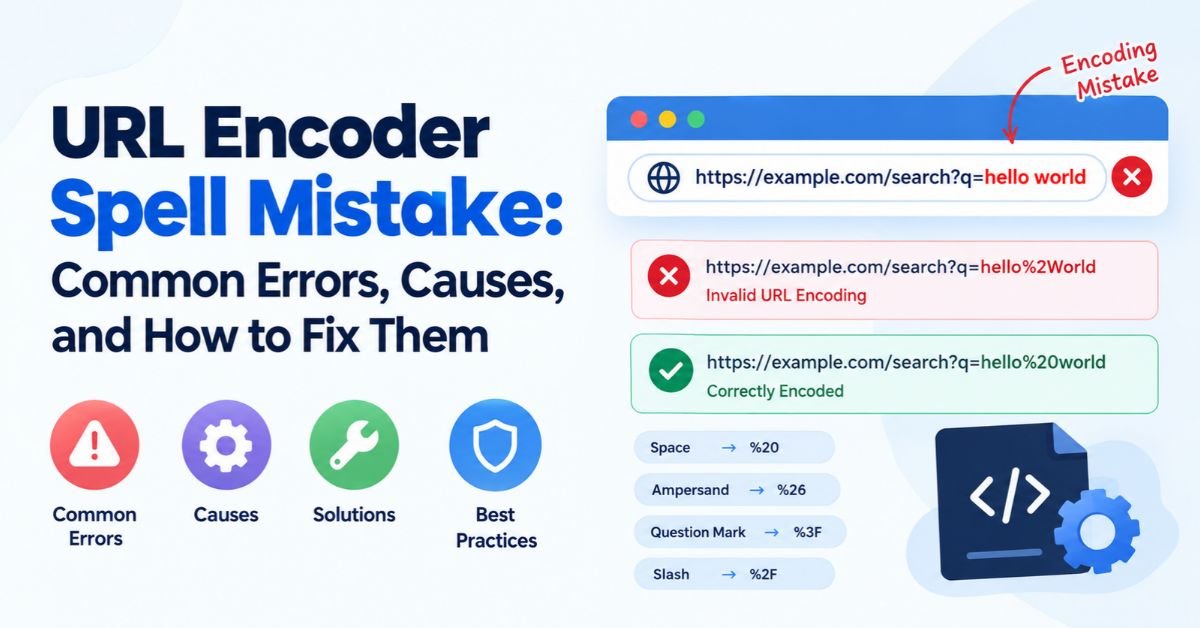
Take the words “Hello World.” The correct output is Hello%20World. A broken version might read Hello%2World. The sequence %2W is invalid because W isn’t one of the hexadecimal digits. Parsers react in different ways. Some reject the request. Others keep the text as it is. That mismatch explains why URL encoding problems often look random. Many URL syntax errors trace back to one habit: nobody checked the encoded URL values.
Understanding URL Encoding and How It Works
Think of mailing a fragile vase. You pad it before it travels. Percent encoding does the same job for a web address. The rulebook is RFC 3986. It says that “a percent-encoding mechanism is used to represent a data octet in a component.” In plain words, unsafe bytes get a safe costume. Every URL encoder and decoder pair follows that idea.
URL syntax sorts characters into groups. Reserved characters such as the slash, question mark, hash, ampersand, and equals sign have special jobs. They mark paths, queries, and fragments. Unreserved characters need no help. These are letters, digits, hyphens, periods, underscores, and tildes. People also call them URL-safe characters. Everything else needs conversion. Browsers follow the same URL encoding standards through the WHATWG URL Standard.
How Characters Are Converted Into Percent-Encoding
The URL character conversion process has four quick moves. The URL encoder reads a character. It finds the byte value in ASCII characters or Unicode characters. Next, it turns that value into hexadecimal digits. Last, it puts a percent sign (%) in front. A space has the byte value 32. In hex, that’s 20. So a space becomes %20. Skipping this step is how URL query string values fall apart. The table shows the most common conversions.
| Character | Encoded Value | Why It Matters |
| Space | %20 | Raw spaces break links |
| ! | %21 | Often safe but sometimes encoded |
| # | %23 | Starts a fragment if left raw |
| % | %25 | Must be encoded inside values |
| & | %26 | Splits query parameters if left raw |
| / | %2F | Separates path segments |
| = | %3D | Separates names from values |
| ? | %3F | Starts the query string |
URL Encoding vs. URL Decoding
URL decoding is the mirror image of encoding. Encoding happens before a request leaves. Decoding happens after a server receives it. Mix up the order and trouble follows. A value decoded too early can change the meaning of a URL. A value decoded twice can create URL decoding errors. Most frameworks decode the URL query string for you. Calling a URL decoder again on that data is a classic mistake.
| Feature | URL Encoding | URL Decoding |
| Purpose | Makes text safe for transport | Restores the original text |
| Timing | Before sending | After receiving |
| Tool | URL encoder | URL decoder |
| Common error | Encoding twice | Decoding twice |
The Role of UTF-8 in URL Encoding
UTF-8 is the standard for modern web text. UTF-8 character encoding turns each character into one or more bytes. Each byte then gets its own percent sign. The letter é uses two bytes. It becomes %C3%A9. A smiling emoji uses four bytes. It becomes %F0%9F%98%80. Proper Unicode URL handling depends on this rule. If one system uses another character set, names turn into gibberish. That is why how UTF-8 affects URL encoding deserves attention early in any project.
Common URL Encoding Mistakes and Their Causes
Small slips cause big failures. A bad character can break a login. A missing digit can crash a search bar. Learning the common URL encoder mistakes helps you spot trouble at a glance. Most of them come from typing codes by hand or mixing systems. The causes of incorrect URL encoding fall into three buckets: manual work, conflicting layers, and mismatched settings.
Each mistake below has a clear fix. Some appear in the browser. Others hide inside HTTP requests between servers. Either way, the damage looks the same: broken URLs, odd errors, and angry users. The table gives a fast overview before the details.
| Mistake | Broken Example | Correct Version |
| Raw space | ?q=red shoes | ?q=red%20shoes |
| Raw ampersand in value | ?q=salt&pepper | ?q=salt%26pepper |
| Incomplete sequence | %2 | %20 |
| Invalid hex digit | %2G | %2F |
| Unencoded city name | city=New York | city=New%20York |
Incorrectly Encoded Spaces
A raw space is never safe inside a link. It should become %20. Inside a URL query string, a plus sign can also mean a space. That rule belongs to form-style data only. In a path, a plus sign stays a plus sign. Mixing the two styles creates odd results. A file called “my file.pdf” may turn into “my+file.pdf” on the wrong server. Learning how to encode special characters in URLs starts with this one habit.
Unencoded Special Characters
Characters such as the ampersand, question mark, hash, equals sign, and percent sign carry meaning. Leave them raw inside a value and the URL parser gets confused. It may think a new parameter has started. That creates query parameter errors that are hard to see. A search for “Tom & Jerry” is a fine example. The ampersand cuts the term in half. Proper URL parameter encoding turns it into Tom%20%26%20Jerry and keeps the phrase whole.
Invalid Percent-Encoding Sequences
Every percent sign needs two hexadecimal digits. Anything less is malformed percent sequences territory. A string like %2 ends too soon. A string like %ZZ uses letters outside the hex range. These are invalid percent-encoding sequences. The fix is simple. Find the broken code, replace it with the right two digits, and re-test. If the percent sign was meant literally, encode it as %25. That is the best answer to how to fix invalid percent-encoding sequences.
See Also: Bobbilou05 in the Digital World: Meaning, Identity & Online Presence (2026)
Misspelled or Incorrect Encoded Values
Typing codes from memory invites errors. A developer may write %3d where %3D was expected. Hex case rarely matters to parsers but may matter to signatures or caches. A worse case is a wrong digit. Writing %26 for a slash instead of %2F changes the data. This is the closest match to what people mean by a URL encoder spell mistake. The cure is to stop hand-typing and let URL encoding functions do the work.
Broken Query Parameters
Query strings use a strict layout. A question mark starts them. Ampersands split pairs. Equals signs split names from values. Break one rule and the whole chain shifts. Compare ?name=John&city=New York with ?name=John&city=New%20York. The second one stays clean. Poor handling leads to query parameter errors. The same pattern drives many URL encoding problems in web applications, from filters to pagination links.
Character Encoding and Unicode Errors
A character encoding mismatch happens when two systems read bytes differently. The name “José” may show as “José.” The page is fine. The bytes were read as the wrong charset. These bugs are common in internationalized URLs and old databases. The cure is to use UTF-8 from the form to the database. Learning how to handle Unicode characters in URLs means one rule: encode as UTF-8 first, then percent-encode each byte.
Double URL Encoding: Causes, Examples, and Fixes
Double URL encoding happens when encoded text gets encoded again. The value “hello world” becomes hello%20world. Encode it a second time and the percent sign changes. The result is hello%2520world. The 25 is the code for the percent sign. Now the server decodes once and sees hello%20world. The user sees a literal %20 on screen. That is why double-encoded URLs feel so strange.
The bug is also a security concern. Attackers use double encoding to sneak past filters. A filter checks %252e%252e and finds nothing wrong. A later layer decodes it into two dots and opens a door. The OWASP page on double encoding explains this attack. Knowing how to prevent double URL encoding protects both your users and your data.
How Double URL Encoding Happens
It rarely comes from one big mistake. It usually comes from two helpful layers. A frontend script encodes a value. Then a framework or proxy encodes the whole URL again. Redirect chains cause it too. A login page may encode a “next” link. A gateway then encodes that link a second time. Each layer thinks it is the only one doing the job. That is a frontend and backend encoding conflict in its purest form.
Common Signs of Double-Encoded URLs
Look for %25 first. It is the loudest clue. A %2520 where a %20 should be is a sure sign. Other hints include literal %20 text on a page and redirects that land on a “not found” error. Search boxes that show strange characters also point to double-encoded URLs. Pairs like %252F instead of %2F are another giveaway. Spotting these patterns turns a long hunt into a short one.
How to Fix Double URL Encoding
Start by finding where the second encoding step happens. Then remove it. Never patch the problem by decoding blindly in a loop. Repeated decoding can reopen security holes. A better path is simple. Decode once. Check the output. Decode again only if the value is still encoded and you know why. Then build the URL again with one trusted function. This is the safest way to decode and re-encode a URL.
Real-World URL Encoding Errors and Examples
Real bugs make the theory stick. The cases below are composite examples. They mirror problems that teams meet often. Shops, banks, and school portals all share them. A tiny URL construction error hides behind each one. Read them as short case studies. Each one shows the symptom, the cause, and the repair.
The pattern repeats across industries. A user types something normal. The system builds a link without care. The server reads a different request than the user meant. Then the page fails with no clear reason. The four cases below cover search, login, downloads, and APIs. Together they show URL encoding errors in API requests and in the browser.
Search Query Failures
Case study: A shop owner notices that searches for “Best laptops & accessories” return empty pages. The site builds the link as ?q=Best laptops & accessories. The server reads the search term as “Best laptops ” and sees a second parameter called ” accessories.” The fix is to encode the value. The correct form is ?q=Best%20laptops%20%26%20accessories. After the change, search results return in full. One encoding call solved a problem that seemed like a database bug.
Login and Redirect Errors
Case study: A school portal sends users to ?next=/search?q=math&page=2 after login. The second ampersand attaches the page number to the outer link instead of the inner one. Users land on page one every time. In another case, a password with a plus sign arrives as a space because form data treats a plus as a space. The fix is to encode the whole inner link and the plus sign. These bugs are classic open redirects risks when left unchecked.
File Download Problems
Case study: A company stores a file named “Report #1 final.pdf.” The download link uses the raw name. The browser treats the hash as the start of a fragment. It never sends the rest to the server. The server looks for “Report ” and fails. The fix is Report%20%231%20final.pdf. File names with spaces, hashes, and ampersands are common triggers. Always run names through an encoding library before placing them in a link.
API Request Failures
Case study: A mobile app calls /api/search?q=laptops & tablets. The server returns an error because “tablets” has no value. Developers blame the backend for days. The real cause is a missing URL encoding for APIs step in the app. The correct call is /api/search?q=laptops%20%26%20tablets. After the fix, API requests pass cleanly. Many “server bugs” are really URL encoding errors that start on the client.
How to Diagnose URL Encoding Errors
Guessing wastes hours. A clear method saves them. Good URL troubleshooting follows the path of the request. Start where the user acts. End where the server answers. Compare the data at each step. The first place where the text changes is the place where the bug lives.
Five checks cover nearly every case. They use tools you already own. Some run in the browser. Others run in logs or a quick console test. Together they answer how to troubleshoot malformed URLs without drama. Work through them in order and write down what you see at each stop.
Inspect URLs Using Browser Developer Tools
Open the browser developer tools with the F12 key. Click the Network tab. Trigger the failing action. Select the request and read the full URL. Compare it with the one you expected. Check the status code too. A 400 often signals URL parsing errors. Right-click the request and copy it as a cURL command if you need a neutral test. This single step solves a large share of broken URLs within minutes.
Check Network Requests and Query Parameters
Look at each pair in the query strings. Compare what the user typed with what the browser sent. Look at query parameters one at a time. Does %26 appear where an ampersand was typed? Does a plus sign show up where you expected %20? Mismatches point to the layer that changed the data. Postman and similar tools make this easy. They list each query parameter in a clean table.
Review Server Logs for Encoding Errors
Server logs show what the server really received. Search for 400 errors and odd characters in the request line. Look for %25 patterns that hint at double encoding. Many servers log “invalid URI” or “malformed request” messages. Those lines are gold. They give the exact path that failed. Compare the logged text with the frontend request. A difference proves the damage happened in transit or in a proxy.
Validate Encoded and Decoded Values
Take a suspect value and run it through a URL decoder. Compare the output with the original input. Decode %2520 once and you get %20. That proves the value was encoded twice. Invalid strings such as %2 often trigger a “URI malformed” error in browsers. That error confirms an invalid URL encoding problem. A trusted URL encoder and decoder pair works as a quick truth test.
Identify Double-Encoding Issues
Hunt for %25 in the request. Decode the value once and look again. If %20 appears in the result, the text was encoded twice. Trace the chain of services. Check the frontend, the proxy, and the redirect logic. Then find the layer that adds the extra step. Fixing that layer cures the symptom. Skipping this hunt only hides the bug until the next release.
See Also: Droven.io Best Tech Tools for Developers: Ultimate Guide for 2026
How to Fix a URL Encoder Spell Mistake Step by Step
Fixing a bug once beats fixing it weekly. A clean process makes that possible. The steps below work for any URL encoding error. They suit small sites and large apps alike. They also answer how to fix URL encoding errors and how to correct an invalid URL with no guesswork.
Follow the order. Skipping the testing stages is the top reason a bug returns. The table gives a quick map. The details follow in each section. Keep the broken URL nearby so you can compare before and after.
| Step | Goal | Quick Tip |
| 1 | Find the exact failing URL and character | Copy it from the Network tab |
| 2 | Confirm the right percent-encoding | Check RFC 3986 |
| 3 | Decode and re-encode with trusted tools | Never edit by hand |
| 4 | Test across browsers | Add a cURL test as a neutral check |
| 5 | Verify in dev and production | Watch logs after release |
Identify the Problem URL and Character
Find the exact request that fails. Copy the full URL. Then narrow it down. Remove parameters one at a time until the error disappears. The last one you removed is the suspect. Look at the characters inside it. Check for spaces, ampersands, percent signs, and accented letters. Precision here saves hours later. A vague guess such as “the search is broken” leads nowhere.
Check the Correct Percent-Encoding Value
Look up the correct code for the character. Use RFC 3986 or the MDN guide to encodeURIComponent. A space is %20. An ampersand is %26. A percent sign is %25. If the value contains non-ASCII text, convert it to UTF-8 bytes first. Each byte then gets its own percent sign. This step prevents incorrect percent encoding before it starts.
Decode and Re-Encode the URL Correctly
Run the broken value through a trusted URL decoder. Look at the plain text. Is it what the user meant? If yes, apply a trusted URL encoder to rebuild it. Encode each value on its own. Do not encode the full URL, since that would break the slashes and question marks. This simple routine is the heart of how to decode and re-encode a URL. Hand edits at this stage often bring new errors.
Test the Corrected URL Across Browsers
Test in Chrome, Firefox, Safari, and Edge. Browsers follow the same standards but differ on edge cases. One may fix a raw space quietly. Another may block it. Add a cURL test as a neutral check. It shows exactly what goes over the wire. This is the best answer to how to test URL encoding across browsers. Record each result so the team can repeat the test later.
Verify the Fix in Development and Production
Test on a development server first. Then repeat on staging. Last, check production with real traffic. Watch the server logs for new 400 errors after release. Compare the old and new request lines. If the numbers drop, the fix works. Add a regression test so the bug stays dead. Good URL validation at this stage keeps the problem from sneaking back during a future update.
URL Encoding in APIs and Web Applications
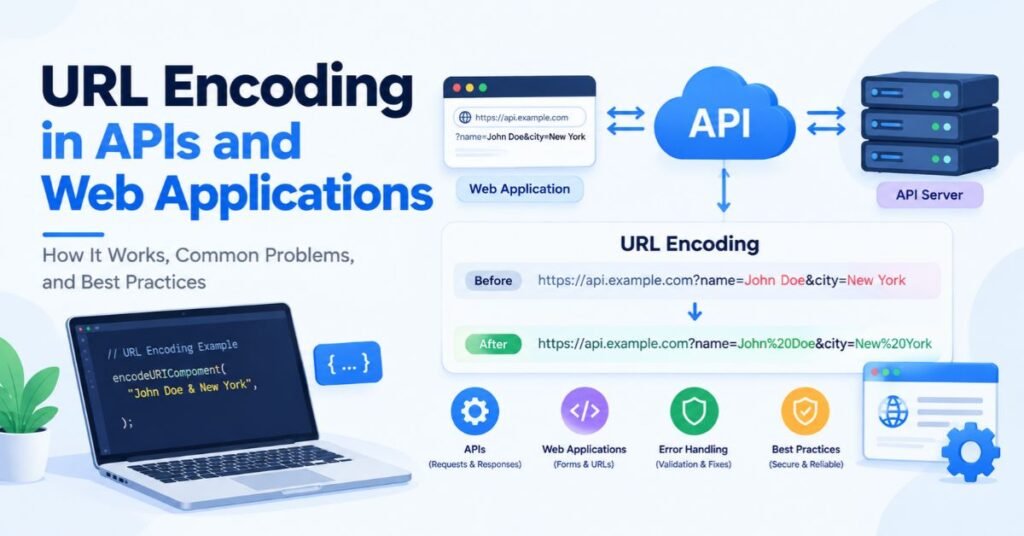
URL encoding for APIs matters more than most people expect. A single raw character can fail a whole request. The rest of your project may be perfect. It won’t matter. The server only sees the final string. Web apps face the same risk. User input flows into links, forms, headers, and redirects. Each spot needs care.
Teams often blame the wrong layer. The mobile app blames the server. The server blames the app. The truth often sits in the middle. A gateway or library may change the text in transit. Clear rules and the right tools remove that fog. The sections below cover the usual traps and the habits that fix them.
See Also: Truzio Explained: Features, Business Benefits, and Digital Transformation in 2026
Common URL Encoding Problems in API Requests
Typical URL encoding problems in web applications include broken tokens, bad pagination links, and failed searches. Signed requests are fragile. A signature built on one version of a string fails if the server sees another. Cursors that contain a plus, slash, or equals sign often break when pasted into links. Each case traces back to a missing or doubled encoding step. Careful URL encoding for APIs keeps these flows steady.
Correctly Encoding Query Strings and Parameters
Encode each value on its own. Then join the pairs with equals signs and ampersands. Never encode the finished URL. Most languages ship tools that do this for you. Use them. The call /api/search?q=laptops%20%26%20tablets is correct. The raw version is not. Proper URL parameter encoding also means choosing between %20 and a plus sign on purpose. Pick one rule and apply it everywhere.
Frontend vs. Backend Encoding Responsibilities
Clear ownership prevents most fights. Frontend encoding builds the request. It converts user input into safe encoded URL values. Backend encoding and decoding handle the server side. The framework decodes the incoming query once. Then the backend validates the result. It encodes again only when it builds new links. When both sides respect this split, frontend and backend encoding conflicts fade away.
Why Manual URL Construction Causes Errors
Joining strings by hand feels fast. Gluing a search term onto the end of a web address looks harmless. It breaks the moment the term holds a space or an ampersand. This is a textbook case of URL construction errors. Builder classes fix it. They encode values as they assemble the link. They also handle slashes and separators. Use them. Manual assembly is also a path to parameter tampering, since attackers can add extra pairs through raw input.
URL Encoding Examples in Popular Programming Languages
Every major language ships built-in URL encoding functions. They differ in small but important ways. Some turn spaces into %20. Others use a plus sign. Some leave slashes alone. Others encode them. Reading the docs before choosing saves pain. These URL encoding examples in programming languages show the safest default for each one.
The table below compares the main options. Every row uses the same sample text: “laptops & tablets.” Notice how the output shifts. That small shift causes many URL encoding problems when teams mix styles. The sections after the table explain each language in plain words.
| Language | Function for a Single Value | Result for “laptops & tablets” |
| JavaScript | encodeURIComponent() | laptops%20%26%20tablets |
| PHP | rawurlencode() | laptops%20%26%20tablets |
| Python | urllib.parse.quote() | laptops%20%26%20tablets |
| Java | URLEncoder.encode() | laptops+%26+tablets |
| C# | Uri.EscapeDataString() | laptops%20%26%20tablets |
URL Encoding in JavaScript
JavaScript offers two main tools. The encodeURIComponent() function encodes a single value. The encodeURI() function encodes a full address but leaves reserved characters alone. Pick the first for parameters. It leaves the apostrophe unencoded, so it will not produce %27. The URLSearchParams class builds whole query strings and writes spaces as plus signs, so the sample text becomes q=laptops+%26+tablets. The MDN reference for URLSearchParams lists every detail.
URL Encoding in PHP
PHP gives you rawurlencode() and urlencode(). The first follows RFC 3986 and writes %20 for spaces. The second follows the older form style and writes a plus sign. For paths and general use, choose rawurlencode(). For whole query strings, http_build_query() does the job and handles arrays well. It writes plus signs for spaces by default. The PHP manual page for rawurlencode lists the exact rules.
URL Encoding in Python
Python keeps its tools in the urllib.parse module. The quote() function writes %20 and leaves slashes alone by default. The quote_plus() function writes plus signs and suits form data. The urlencode() function builds a full query from a dictionary of pairs. Change the safe setting when you need to keep or encode slashes. The Python urllib.parse documentation explains each option.
URL Encoding in Java
Java uses the URLEncoder.encode() method. Always pass a charset such as StandardCharsets.UTF_8 so the result stays predictable. Since this class follows form rules, it writes spaces as plus signs. If you need %20 for a path, replace the plus signs after encoding. That small trick avoids many URL encoding errors. Check the Java URLEncoder documentation before using it for anything other than form-style data.
URL Encoding in C#
C# also has two main paths. Uri.EscapeDataString() follows RFC 3986 and writes %20. WebUtility.UrlEncode() writes plus signs. For query values, the first is the safer pick. Microsoft explains the details in the Uri.EscapeDataString reference. Pair it with the UriBuilder class when you build whole addresses. That approach shrinks the chance of URL construction errors.
How URL Encoding Errors Affect SEO
URL encoding and SEO are linked more than most site owners think. Search engines handle clean, correctly encoded links well. The trouble starts with broken or inconsistent ones. A bad link wastes attention. It may also split signals across versions of one page. The effect is rarely loud. It builds slowly, which is why many teams miss it.
Be careful with big claims. Encoding alone will not wreck a healthy site. Still, how malformed URLs affect SEO is worth tracking. Google asks for sensible links in its URL structure guidance. Following that advice keeps search engine crawlers moving smoothly. The sections below cover crawling, duplicates, indexing, international pages, and visitors.
See Also: Unbanned G+ Explained: What It Is, How It Works, and Is It Safe?
URL Encoding and Search Engine Crawling
Search engine crawlers follow links they find. A malformed link may lead to an error page. Each error wastes a small slice of crawl effort. On a large site, those slices add up. Crawlers may also meet endless variations of one link. Clean, predictable links help them move fast. This is the heart of URL encoding errors and search engine crawling. Fix the source of the bad links and the waste stops.
Duplicate URLs and Canonicalization Issues
Inconsistent encoding can create duplicate URLs. Hex digits may appear in upper or lower case, such as %2f and %2F. A page might also load with and without encoded characters. Standards treat many of these forms as the same. Servers may not. That gap can lead to URL encoding and duplicate content problems. Canonical URL tags help here. They point search engine indexing toward the version you prefer. Redirects add a second layer of safety.
Indexing Problems Caused by Malformed URLs
A page that returns an error cannot enter search engine indexing. A link that loops or splits can confuse the crawler. Even strong content may stay hidden. Sitemaps are a common source of this issue. If a sitemap lists a double-encoded link, bots may hit a dead end. Run URL validation on every sitemap entry. Use a URL validator after each release to catch bad entries early.
International SEO and Unicode URLs
Internationalized URLs need extra care. Domain names use a separate system called Punycode. Paths and queries use UTF-8 with percent-encoding. A path in Arabic, Hindi, or Japanese becomes a long string of percent codes. That is normal. Problems start when a site mixes character sets. Google advises UTF-8 for non-ASCII text in its guidance. Careful Unicode URL handling protects visibility in every market.
How Encoding Errors Damage User Experience
Visitors judge a site by how it behaves. A shared link that dies feels sloppy. A redirect that lands on the wrong page costs trust. Long strings of percent codes in a message also look suspicious. Some people won’t click them. Clean encoded URL values help real users as much as bots. Fast fixes keep broken URLs from turning into lost sales or lost readers.
Security Risks of Improper URL Encoding
Encoding is a safety layer. It is not a full shield. Weak handling of URL data opens doors for attackers. The risks grow when user input flows straight into links, redirects, or database calls. Knowing the security risks of improper URL encoding helps teams set priorities. The OWASP Input Validation Cheat Sheet is a solid starting point.
Several attacks lean on bad handling. Injection attacks slip harmful text into queries. Parameter tampering changes values in a link. Open redirects send users to hostile sites through a trusted domain. Encoded filter bypasses hide payloads in %25 tricks. Each one grows from the same root: the system trusted text it should have checked. Strong best practices for safe URL construction reduce all of these at once.
Input Validation and Injection Risks
Validate first. Encode second. Input validation checks that a value fits the expected shape. A page number should hold digits only. A redirect target should match an allow list. Then the system encodes the value for the place where it will appear. The OWASP guide on unvalidated redirects shows how to guard redirects. Never trust a value only because it was encoded.
Why Context-Aware Encoding Matters
Different places need different encoding. A URL needs percent encoding. HTML needs entities such as the ampersand entity. A JavaScript string needs its own escapes. Using the wrong one leaves a gap. Context-aware encoding picks the right tool for each spot. It also avoids double encoding, which happens when one layer treats already-safe text as raw. Match the encoder to the destination every time.
Best Practices to Prevent URL Encoding Errors
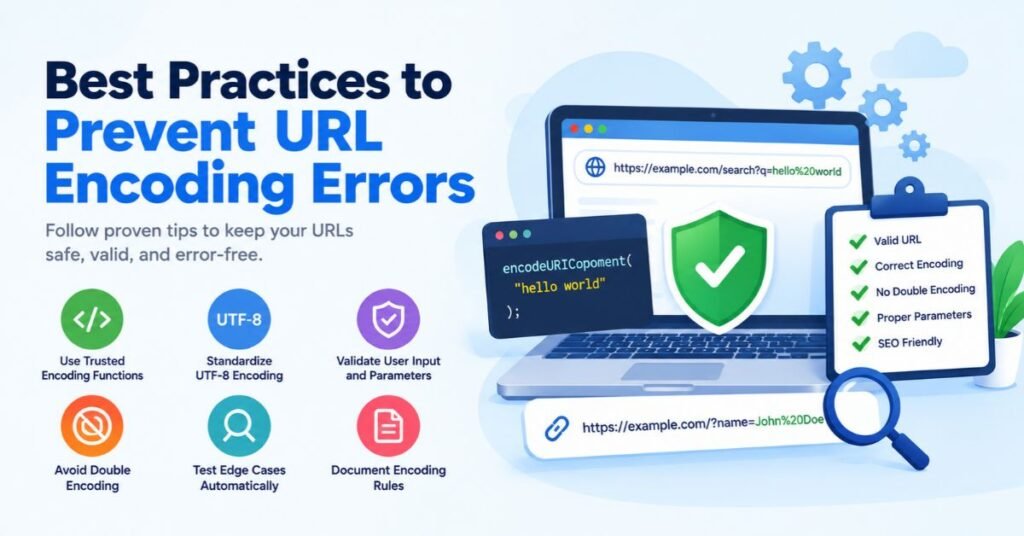
Prevention is cheaper than debugging at midnight. A few small habits remove most bugs before launch. These URL encoding best practices suit tiny blogs and busy platforms alike. They also answer how to validate URL parameters with steady, repeatable rules. Adopt them early. Adding them later costs more.
Think of the habits as a safety net with six strands. Each strand covers a different gap. Used together, they make URL encoding errors rare. The sections below explain each strand in plain terms. Share them with every developer who touches links, forms, or API work.
Use Built-In URL Encoding Functions
Trust the tools that ship with your language. They follow current URL encoding standards. They handle odd cases better than hand-written logic ever will. Pick encoding libraries with a good record. Avoid string replace tricks such as swapping spaces for %20 by hand. Those shortcuts miss ampersands, hashes, and non-ASCII text. One trusted URL encoder call is almost always safer than a clever fix.
Standardize UTF-8 Character Encoding
Use UTF-8 character encoding everywhere. Set it in the database, the server, the templates, and the frontend. Declare it in HTTP headers and HTML meta tags. One stray Latin-1 setting can wreck names and symbols. A single project-wide rule beats scattered fixes. It also supports how UTF-8 affects URL encoding in the cleanest way, because every layer agrees on how to read bytes.
Validate User Input and URL Parameters
Check every value before it joins a link. Define the allowed length, type, and range. Reject anything that doesn’t fit. Use URL validation on full links too. A URL parser can split an address into parts so you can check each one. This habit stops malformed input early. It also reduces the odds of injection attacks and parameter tampering.
Avoid Unnecessary or Repeated Encoding
Encode once at the edge where the value enters a URL. Do not encode it again later. Track which layer owns that job. Add a note so the next developer knows. Watch for libraries that encode on your behalf. Some HTTP clients already encode query values. Passing them pre-encoded text creates double URL encoding. A short note in the project docs can prevent days of confusion.
Test Edge Cases Automatically
Add automated testing around tricky input. Try emojis, accents, long strings, plus signs, percent signs, and ampersands. Test empty values and values with only spaces. Run the same tests on each browser and each API route. A short test suite catches regressions before users do. This one habit guards URL encoding errors in API requests better than any code review can.
Document Encoding Rules Across Systems
Write the rules down. State who encodes, who decodes, and which charset applies. Note the choice between %20 and a plus sign for each case. Share the page with frontend, backend, and QA teams. Updating that page after each change keeps everyone aligned. Clear notes remove the guessing that fuels frontend and backend encoding conflicts. They also speed up onboarding for new developers.
Best URL Encoding Tools for Testing and Validation
The right tools turn long hunts into quick checks. Some run in the browser. Others run in scripts or in test suites. Choosing the best URL encoder and decoder tools depends on the job. A quick paste works for a one-off check. A script works for daily checks. The sections below show where each type fits.
Always think about privacy. Never paste secrets, tokens, or personal data into a random web tool. Use a local method for sensitive values. The table lists common tool types and when to use them. Mixing several tools gives the clearest picture of what is happening to a link.
| Tool Type | Best For | Example Use |
| Online encoder and decoder | Quick manual checks | Decode a suspect %2520 value |
| Browser developer tools | Live request inspection | Read URLs in the Network tab |
| URL parser | Splitting links into parts | Check host, path, and query |
| API testing tools | Repeatable request tests | Compare raw and encoded calls |
| Automated test suites | Ongoing protection | Run edge cases on every release |
Online URL Encoder and Decoder Tools
A web-based URL encoder and decoder is the fastest way to test a string. Paste the text. Click a button. Read the result. These tools are perfect for learning and for one-off checks. They also help you show a bug to a teammate. Keep sensitive data out of them. For private values, use your own console or a local script instead.
URL Validators and Browser Debugging Tools
A URL validator checks that a link follows the right syntax. A URL parser splits it into scheme, host, path, and query. Most languages include one. JavaScript has the URL class. Python has urlparse. URL debugging tools built into browsers, such as the Network tab and the console, show real traffic. API tools such as Postman display each parameter in a clean list. Together they simplify URL parsing errors hunts.
See Also: CNLawBlog Explained: What It Covers and Is It Trustworthy?
When to Use Online Tools vs. Programming Libraries
Use an online tool for a fast look. Use a library for anything that runs on its own. A system that builds links in production must not depend on a person pasting text into a page. Libraries are repeatable, testable, and safe from copy-paste slips. Manual tools bring human error back into the loop at scale. Treat them as helpers for investigation, not as part of the product.
URL Encoding Checklist for Developers
A checklist keeps habits steady across a whole team. It turns good intentions into routine. People forget things under pressure. A printed list does not. The three tables below split the work into build, test, and release. Use them in reviews and in release notes.
Adapt the items to your stack. Add rows for your own risks. Review the list every few months. As tools change, the list should change too. A living checklist is one of the cheapest ways to enforce URL encoding best practices. Each tick is a bug that never reaches users.
Development and Implementation
Start with the build stage. The table covers the habits that matter most while writing the project. Each row ties to a mistake covered earlier. Check them before you open a pull request. Even experienced developers skip one when rushing.
| Task | Why It Matters | Done |
| Use built-in URL encoding functions | Follows current standards | ✔ |
| Encode each value, not the full URL | Keeps separators intact | ✔ |
| Set UTF-8 everywhere | Prevents charset mismatch | ✔ |
| Validate all input before use | Blocks bad data early | ✔ |
Testing and Validation
Next comes the test stage. These checks prove that the work holds up in real cases. Cover odd input as well as normal input. Run them on more than one browser. Include API paths in the plan. Automation makes this step quick and repeatable.
| Task | Why It Matters | Done |
| Test spaces, ampersands, hashes, percent signs | Catches core mistakes | ✔ |
| Test accents, emojis, and non-Latin text | Confirms Unicode handling | ✔ |
| Run API request flows end to end | Exposes hidden conflicts | ✔ |
| Search for %25 in outputs | Finds double encoding | ✔ |
Deployment and Maintenance
The last stage covers life after launch. Links change. Redirects pile up. Sitemaps drift. A short routine keeps them healthy. Review logs on a schedule. Re-check key pages after each release. Small habits here prevent slow SEO damage.
| Task | Why It Matters | Done |
| Check redirect links after each release | Prevents wrong landings | ✔ |
| Review canonical URL tags | Reduces duplicate pages | ✔ |
| Monitor server logs for 400 errors | Spots new encoding bugs | ✔ |
| Validate sitemap links | Protects indexing | ✔ |
Frequently Asked Questions
What Is a URL Encoder Spell Mistake?
A URL encoder spell mistake is a common search phrase for invalid URL encoding. It covers missing percent signs, incomplete sequences, wrong hex digits, and unencoded special characters. The cause is rarely a real typo in a word. It is usually a flaw in the encoding step. The fix is to rebuild the value with a trusted function and test the result.
How Do I Fix Invalid URL Encoding?
Find the broken character first. Look up its correct percent code. Decode the value with a trusted URL decoder. Then re-encode it with a trusted URL encoder. Test the new link in more than one browser. Avoid manual edits where possible. Following that routine answers how to fix URL encoding errors in most cases.
What Causes Double URL Encoding?
Double URL encoding happens when already-encoded text gets encoded again. Two layers each do the job without checking the other. A script, a framework, and a proxy may all take part. The sign is a %25 where a single percent sign should sit. The cure is to assign encoding to one layer and remove the extra step.
Does URL Encoding Affect SEO?
It can. Correct encoding is harmless and standard. Broken or inconsistent encoding may waste crawl effort, create duplicate URLs, and block search engine indexing. Sitemaps and internal links deserve the most attention. Clean links, consistent UTF-8, and canonical URL tags reduce the risk. That is the practical meaning of URL encoding and SEO.
What Does %27 Mean in URL Encoding?
The code %27 stands for the apostrophe, also called the single quote. Its ASCII value is 39. In hex, that is 27. Some functions leave the apostrophe alone. JavaScript’s encodeURIComponent() is one of them. If a system needs %27, replace the apostrophe with it after encoding or use a library that handles it.
How Is a Question Mark (?) Encoded in a URL?
A literal question mark inside a value becomes %3F. A question mark outside a value marks the start of the URL query string. That role is why it needs encoding when it is part of the data. Searching for “Why?” should send Why%3F as the value. Leave the separator raw and encode only the data.
Should Spaces Be Encoded as %20 or +?
Use %20 when you want a safe choice. It works in paths and in query strings. A plus sign means a space only in form-style data, such as application/x-www-form-urlencoded. In a path, a plus sign stays a plus sign. The table shows the difference.
| Place | %20 | + |
| URL path | Works | Stays a plus sign |
| Query string | Works | Often read as a space |
| Form data | Works | Standard for spaces |
Does a Hyphen Need to Be Encoded in a URL?
No. A hyphen is an unreserved character. It is safe in every part of a URL. Encoding it as %2D is legal and decodes to the same hyphen. Still, it adds noise. Some systems treat the two forms as different strings. Leave hyphens alone unless a rule in your system says otherwise.
Conclusion
A URL encoder spell mistake almost always means one thing: the encoding went wrong somewhere in the chain. It may be a missing percent code. It may be double URL encoding. It may be a character encoding mismatch. The cause is usually simple once you trace the request from the user to the server. A calm, step-by-step check beats guessing every time.
The cure is just as clear. Use trusted URL encoding functions. Keep UTF-8 everywhere. Validate every parameter. Test strange input with automated testing. Run the checklist before each release. Follow these habits and URL encoding errors will shrink to rare events. Pick one tip from this page. Apply it to your next link today.